Tab Behavior and Display
Customizing Tabs in Floorp
Floorp offers various options for tab pinning, scrolling, new tab opening positions, minimum tab sizes, and closing tabs via double-click.
These options are designed to work seamlessly alongside other tab bar configurations.
You can modify these settings by navigating to Settings > Tab & Appearance > Tabs.
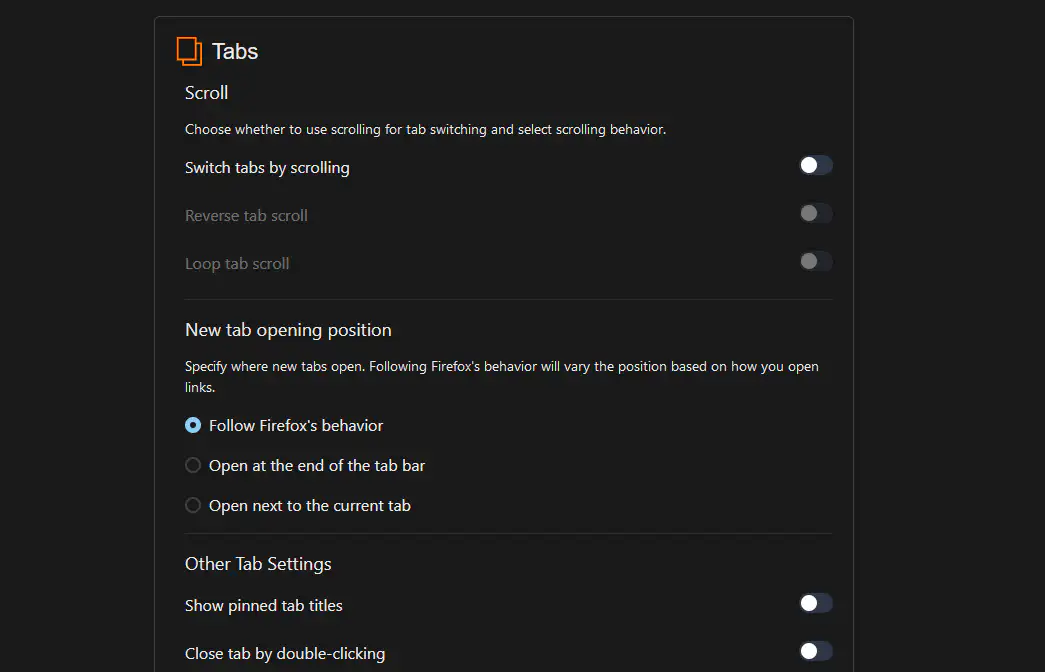
For details on other sections within Floorp Hub > Tabs & Appearance, please check the following articles:
Customizing Tab Behavior
Scroll
Configure whether to switch tabs by scrolling the mouse wheel, and how that scrolling behaves.
-
Switch tabs by scrolling
When enabled, you can switch between tabs simply by scrolling on the tab bar.
By default, this feature is disabled, and the tab bar will instead scroll horizontally when tabs overflow. -
Reverse tab scroll
When enabled, the direction for switching tabs via scrolling is reversed.
This is disabled by default and requires the "Switch tabs by scrolling" option to be enabled. -
Loop tab scroll
When enabled, scrolling past the last tab wraps around back to the first tab (and vice versa).
This is disabled by default and requires the "Switch tabs by scrolling" option to be enabled.
You can also switch tabs using keyboard shortcuts, mouse gestures, and the command palette.
New Tab Opening Position
Set the default location where newly opened tabs are placed.
-
Follow Firefox's behavior
The location of new tabs changes dynamically based on how you open a link and your current browsing actions.
This is the default setting. -
Open at the end of the tab bar
Always opens new tabs at the very end of the tab bar.
-
Open next to the current tab
Always opens new tabs immediately to the right of your currently active tab.
Other Settings
Configure additional preferences such as pinned tab behavior, double-click actions, and dimensions.
-
Show pinned tab titles
When enabled, pinned tabs will display their text titles alongside their favicons, instead of showing the icon only.
This is disabled by default. -
Close tab by double-clicking
When enabled, double-clicking the active tab will instantly close it.
This is disabled by default. -
Minimum tab width
Sets the minimum width of tabs in pixels (px). Note that this is a minimum threshold; tabs may become larger depending on your layout settings.
The default value is76. -
Minimum tab height
Sets the minimum height of tabs in pixels (px). This is a minimum threshold; tabs may become taller depending on your layout settings.
The default value is30.
Tab Sleep Exception
Firefox includes a native feature that automatically unloads tabs from memory when system RAM runs low to prevent browser crashes.
Floorp allows you to specify certain websites to be excluded from this automatic unloading behavior.
You can enter exception patterns using the following formats:
-
floorp.appExcludes all URLs containing
floorp.appfrom being automatically unloaded. -
*.floorp.appExcludes subdomains of
floorp.app(such asdocs.floorp.apporblog.floorp.app) from being unloaded. Note that the main domainfloorp.appitself is not excluded by this specific pattern. -
https://docs.floorp.app/*Excludes all pages residing within
docs.floorp.appfrom being automatically unloaded.